Showing posts with label Phone. Show all posts

Wednesday, July 4, 2012

The Slow Fall of RIM - Blackberry

David Miller wrote in his blog about why he thinks Thorsten Heins has the toughest job in tech.   I wanted to share my thoughts as well.


Postulation: All smartphones can accomplish the same general types of tasks, only vary by the feature set (thus complexity) of accomplishing them and the computer literacy of the marketplace.  Thus I believe there are TWO market segments of smartphones: Computer literates demanding features, and "Newbies" demanding simple limited experiences. 

Theory:  As computers permeate the world computer literacy is increasing, thus the market for phone features is increasing.  RIM has stayed focused too long on "Newbie" limited simple experiences of email and BlackBerry messaging thus losing customers in mass in todays world.

Background:
In order to understand what is happening currently you need to look back to the Pager where it all started.   Everyone that needed to be "connected" had a pager before anything else and Motorola was the original key player here.

Motorola (Pagers, StarTac , Razor): Created both hardware and software for their first devices.  They  were extremely featured limited and very simple to use for the "non-computer literate" crowd of the 80's and 90's and were successful.   

As the world passed and the cost of developing software declined they had the wherewithal to pull out of the software market, partner with other companies (J2ME, Android), and focus on their established hardware development segment.  While Motorola is no longer a giant in the connected device market, they do still stay relevant ("DROID!") and are still in a great position.
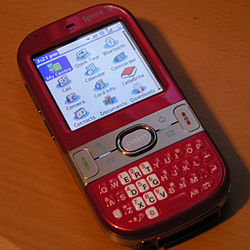
PalmOS (Kyocera, Visor, Treo):  Allowed a very small segment of people who were very computer literate in the late 90s, to access Web, Email, Calendar, Tasks list and sync them with their desktop computers.   If you were a Realtor you had one of these and loved it because _nothing_ gave you the same functionality in those days.   

Their devices were very intimidating to non computer literate people.   Palm saw their market as only limited to those comfortable with technology and drove features even further (Windows CE / Mobile hit the scene).   

IT did finally occur to them in 2007 the "newbie" market may be a big success (Hello iPhone) and tried to retool their devices and marketing (Centro / PalmPre) but was too late.

Microsoft (Windows CE / Mobile ): Like Palm drove for ever increasingly amount of features trying to appeal to the computer literate, all the while ignoring the "newbie" segment.   As with most, have realized that there is money in limited phone experiences and are pouring tons of cash into "dumbing down" their user experience.   Unfortunately for them trying to "catch down" to iPhone levels is the opposite of what the current market is starting to want.

RIM (Inter@ctive Pager, Blackberry):  Competitors initally to Motorola in the paging markets and they too created hardware and software for their devices.  They flourished in the "Newbie" market and rode that wave as long as they could.  Unfortunately for them people are driving for more features out of their smartphones and are realizing too late they need to go beyond BBM.  

They could make a comeback but only if they do it "Motorola Style" by giving up the Mobile OS market and partnering with Android to bring BES, BBM as an integrated experience with their awesome keyboard based hardware.


Saturday, June 30, 2012

Apple wakens the sleeping Android giant - Google

After years of Apple taking legal potshots at various Android device manufacturers for specific devices, they have finally landed a legal success against the mothership Google.  Google is now prevented from selling their very own Android phone (Galaxy Nexus) for the specific reason of having a unified search experience!  No less than a couple of days from their annual marketing blitz surrounding the device and the ecosystem.   Undoubtedly this is going to finally trigger a return fire.

What can Google return fire with?  Plenty.  For instance they acquired Motorolla Mobility which holds a bunch of very important mobile device patents that Apple has initially been found to be violating.   Google will be forced to become a legal expert now and Im sure this and many future filings from them will sting Apple at its core revenue stream this summer / fall. 

If Google cannot sell their Android appliances, it will hurt their ego but not dent their revenue.  If Apple cannot sell their iOS devices, they lose almost everything.


Saturday, June 16, 2012

First Foray into Balloon Photography

With the help of my daughter, we managed to build and fly our first photography balloon! 


I got the idea from reading an blog post months ago about people using balloons to get aerial pictures to enhance maps.  My daughter and I put our heads together and came up with a simple prototype with the materials we had on hand.  I have since found this site that gives a really good overview of a design:  http://publiclaboratory.org/tool/balloon-mapping.

From the prototype we flew today we discovered the following issues and thus our next design changes:

  • Wind drag - Reduce to just one large balloon as the two were catching turbulence from each other as well as from the wind.   The balloon didnt make it all that high due to it being constantly pushed away from us.
  • Stability issues - Follow the design from the Public Laboratory link to add stability arms and a better center of gravity.
  • String Management - Using a simple spool made it difficult to deploy / retrieve.  Definition going to get a hold of a cable reel.
  • Height - Definitely need more than 200 ft of string to get a better angle on the ground

Sunday, January 29, 2012

Producer / Consumer - The new personal computer paradigm ( Buying a Tablet PC )

Im sure you have all recently been to Coffee House or even business / professional meetings where you have seen a diverse group of computing devices in use; Laptops, Netbooks, Smartphones, Tablets, and Media Players.   Seeing all this variety I started thinking about a general paradigm for computing devices when trying to rationalize purchasing a Tablet PC recently.  I explain below...

History:
Tablet computing devices (what I define as mobile computer with an interactive screen) have come and gone over the decades and so has my interest in purchasing one.   For me it all started with seeing someone use an Apple Newton Message Pad in 1994.  While they were very clever devices I never really saw someone effectively using them without a) Running out of battery power or b) fighting with the handwriting recognition.   Either way I didnt have an abundance of cash back then so I never got around to owning one.   

In the 96 I purchased a PalmPilot PDA which quite literally changed my life in a way that no other computing device had ever done before or since.   I was able to keep track of ToDos, Grocery lists, calendar appointments, read books, read / send synced email, and even play games all on one device.  Even the Graffiti interface was extremely intuitive and easy to use for writing text.    I would hazard a guess that most folks that had early PDA's have since migrated onto using the smartphone form factor (Visor / Treo, Kyocera 6035, etc) as did I.  

This left a little bit of a gap in the Tablet concept until Microsoft reintroduced the concept in the early 2000s which were essentially the first round of large screen / big CPU Tablets to be produced.  As "Cool" or  "Star-Trek like" these devices were I could never justify spending money on that platform and really didnt know why at the time.   Curiously adoption rates weren't that high and I wouldn't really consider the platform a success unless you talk about the "Hybrid" Tablet PCs that evolved out of that.    

The recognition of a new computing platform paradigm started with the Hybrid Table PC.  These devices married an interactive touch screen with either a folding or swivel based keyboard that could be hidden.   Compaq was the first notable manufacturer of this devices for Microsoft's new platform and I was quick to pick up an HP Compaq TC4200.  Finally a computer I could justify spending thousands of dollars on! Well I have examined that justification over-and-over-again ever since, as the more I used that computer the less I used the interactive screen and the less I understood why I bought it in the first place.

The iPad!  Apple's re-introduction of the same concept, however, this time with "je ne sais quoi" that enables mass amount of people to purchase them.  There doesnt seem to be many profound differences over the earlier Tablet PCs other than a slightly more intuitive touch interface, perhaps a bit better battery life, and less weight.

And last but not least, the Apple chasing OEMs with various Android / Rim / WebOS based devices promising the same experience but unable to make as huge of a dent in the marketplace.

Paradigm:
For a long time Computing devices overall have been categorized as "Mainframe / Personal Computer", "Client / Server", "Desktop / Laptop", "Netbook", "Tablet / Phone", etc.    As technology increased in both computing capability, peer-to-peer protocols, and wireless digital networking I believe these categorizations need updating and is the key to understanding how a Tablet PC fits in.

Quite simply, in the Personal Computer world people are performing either two tasks; producing content or consuming it.   Therefore all PCs can be classified and weighted by their ability in these two areas of "Producer / Consumer".   This is obviously a very broad classification system that like all others has exceptions (Graphics Artist Producing Content who finds Tablets better than keyboards) so this categorization cannot be used without considering the user of the device.   But for the the general population I think device classification can applied and people should rationally consider how the device they are using fits into those two categories for them.

Now your thinking, well that is not very profound and quite obvious.  Well.. How obvious in the productive "producer" workplace?  How many times have you seen people in meetings are scrambling to enter data by hunting and pecking at a Tablet or Smartphone keyboard instead of their Laptop? ;)


Thursday, December 29, 2011

Differences between Android and iOS (On Phone Platforms)

A long time Android user that I know switched to an iOS platform and that got me thinking about why and what are the current differences between the two platforms.  This is my attempt to gather my thoughts and share for input.

Once upon a time the only "SmartPhone" in town was the PalmOS / WinCE platforms.  When the iPhone first came out it was a very compelling platform to me because it was a new platform design primary for Touch based use, whereas I had been using stylus based interfaces on my prior phones.

Typical Apple UI engineering gave it an alluring pull to many, but the lack of functionality always steered me away in the end.   So what functionality was it lacking in comparison these past years?  Apple may have started the touch based device revolution, but they were certainly not quick to develop it out more.

Differences of the Past (First to Market)

Feature First To Market
Multi Touch Interface (Pinch - Zoom) iOS
Hardware Accelerated UI (Fluidity) iOS
Consistent UI iOS
Voice Dial Android
Bluetooth Music A2DP Android
Notification Light Android
MS Exchange Email iOS
MS Exchange Calendar Android
Camera Flash Android
Camera Focusing Android
Removable Battery Android
Removable Storage Android
Pull Down Notifications Android
Cut and Paste Android
Cloud Sync Android
OTA Updates Android
Multi-Tasking Android
Physical Keyboard Android
Alternate Software Keyboards Android
Sideload Applications Android
Multi Core CPU Android
4G Data Android
Camera Button Android
Netflix iOS
OpenSource OS Android
Hierarchical FileSystem Android
720p Resolution Android
16:9 Screen (Movie Aspect) Android
Retina Display > 326 ppi iOS
NFC - Close-Contact Payments Android
Application Integration (Google Voice tie into Dialer, etc) Android
Widgets Android
Launcher Customization Android
Included Turn-By-Turn navigation Android
Alternative Browsers Android
BlNFC - Close-Contact Paymentsuetooth HID (Keyboard / Mouse) Android
HDMI Output Android
Wireless 802.11N Android
4" Screen Android
OLED Screen Android
IPS Screen iOS
Long Press Android
Custom Accessory Standard (iDock) iOS
WiFi Tether Android
Front Facing Camera Android
Pattern Unlock Android
Face Unlock Android
Free Text Voice Search (Siri) iOS
VoIP Android
Free Software Developer Kit Android
Wacom Stylus Android
Laptop Dock Android
MicroUSB port Android
Application Level Permissions Android
USB Host ( External Storage / HID / Audio / Serial ) Android
All capacitive buttons Android
All on-screen buttons Android
Pop-up Video Player Android
WiFi Hotspot Android
Wireless Charging Android
Auto Panoramic Android
Guided Access (Parental Controls) iOS
Wallet / Passport Android
Scalable Apps (No letter-boxing) Android
Smart Stay - Screen keepalive Android
Best Photo Android
Do-Not-Disturb Android
Split Screen Multitasking Android

Now that we have covered the past, what are the differences today?

Differences Today @ 9/15/2012

AndroidiOS
  • Notification Light
  • Physical Keyboard
  • AMOLED Screen
  • Sideload Applications
  • Opensource OS
  • Alternative Keyboards
  • HDMI Port
  • MicroUSB Port
  • Widgets
  • Launcher Configuration
  • >4" Screen
  • >720p Resolution
  • NFC - Close-Contact Payments
  • Application Integration
  • Hierarchical Filesystem
  • 4G Data (LTE / Wimax)
  • VoIP
  • Removable Storage
  • Removable Battery
  • Pattern Unlock
  • Face Unlock
  • Wacom Stylus
  • Laptop Dock
  • Application Level Permissions
  • USB Host
  • Pop Up Video Player
  • All capacitive buttons
  • All on-screen buttons
  • Wireless charging
  • Smart Stay - Screen keepalive
  • Best Photo
  • Split Screen Multitasking
  • Consistent UI
  • Free Text Voice Search
  • Better Accessories (iDock)
  • Guided Access (Parental Controls)
As you can see there are quite a few gaps between the two and to me it would appear more features in favor of Android than iOS.   However, it is up to personal preference to attach appropriate weights to each of these to make a decision.  For now Im staying with my Android based phone.


Friday, September 10, 2010

Android - CyanogenMod 6 (CM6) GPS Fix

Having some recent problem with the GPS locking. Found this post which talks about a way to reset the AGPS data on the phone for faster and reliable locking in the future.


http://wccftech.com/2010/09/09/solving-gps-nofix-problem-cyanogenmod-6-nexus/

Sunday, August 8, 2010

Stream Videos to Android (Part 2) HTC EVO

Went a slightly different route but got reliable video streaming to finally work on my phone from my movie server at home:

Obtain Market App: VLC Stream & Convert qr

Start up VLC on host computer (On port 8091):

vlc -I http --http-host :8091

Start app VLC Stream & Convert

- Select Menu / Connect

- Enter your IP <hostname> and 8091 port

To fix audio lag go to: Menu->Settings->Stream rtsp->Synchronize on audio

Thursday, August 5, 2010

Create a PKCS .p12 certificate

Needed to import a certificate to use OpenVPN on Android.

Using Openssl:
openssl pkcs12 -export -in private-cert.crt -inkey private-key.key -certfile ca.crt -name "[friendly name]" -out new-cert.p12

Thursday, June 24, 2010

Watching Streaming Video on Android HTC EVO Phone

Trying to figure out a way to view live TV / Movies / Video from my A/V devices at home on my Android HTC EVO Phone.

To play a movie:

Start VLC client on Ubuntu:


# vlc -v video.avi -I dummy --sout "#transcode{vcodec=h264,venc=x264{no-cabac,level=12,vbv-maxrate=384,vbv-bufsize=1000,keyint=75,ref=3,bframes=0},width=320, height=180,acodec=mp4a,ab=64,vb=384}:rtp{dst=,port=4555,sdp=rtsp://server:4555/stream.sdp,mp4a-latm}"


Start Movie Client Stream on Android:
- Open browser
- Browse to "rtsp://server:4555/stream.sdp"
- Watch stream!

To Watch live TV:
vlc -v vlc -v v4l2:///dev/video0 :v4l2-standard=3:v4l2-standard=45056 :v4l2-chroma= :v4l2-input=1 :v4l2-audio-input=0 :v4l2-io=1 :v4l2-width=640 :v4l2-height=480 -I dummy --sout "#transcode{vcodec=h264,venc=x264{no-cabac,level=12,vbv-maxrate=384,vbv-bufsize=1000,keyint=75,ref=3,bframes=0},width=320, height=180,acodec=mp4a,ab=64,vb=384}:rtp{dst=,port=4555,sdp=rtsp://192.168.13.5:4555/stream.sdp,mp4a-latm}"

Start Movie Client Stream on Android:
- Open browser
- Browse to "rtsp://server:4555/stream.sdp"
- Watch stream!

I am seeing about a 1/2 sec lag on audio and am looking into that. Any help would be appreciated!

vlc -v v4l2:///dev/video0 :v4l2-standard=3:v4l2-standard=45056 :v4l2-chroma= :v4l2-input=0 :v4l2-audio-input=0 :v4l2-io=1 :v4l2-width=640 :v4l2-height=480 :v4l2-tuner=0 :v4l2-tuner-frequency=673250

--------
References:

Obtain Streaming Video Player (yxPlayer):
http://mobilesoft.kr/android.html

Try broadcasting from VLC:
http://www.videolan.org/doc/streaming-howto/en/ch04.html

Once I get a working solution, ill update this post.

Saturday, June 12, 2010

Install Android SDK Eclipse plugin on Ubuntu 10.04

Started to work on developing some Android applications on my Ubuntu 10.04 (Lucid) machine and ran into a few complications during installation of the Eclipse plugin. Started getting a dependency for "org.eclipse.gef" when trying to follow Google's instructions.

Here is how I did it:
- Ensure Eclipse is installed (sudo apt-get install eclipse)
- Run Eclipse
- Select "Help" -> "Install New Software..."
>>>Repeat the following for the list of repositories<<
- Select "Add"
- Enter the Name and Location of the following
Name: Android Plugin
Location: https://dl-ssl.google.com/android/eclipse/
>>
Name: Data Tools
Location: http://download.eclipse.org/datatools/updates
>>
Name: Web Tools
Location: http://download.eclipse.org/webtools/updates/
>>
Name: EMF
Location: http://download.eclipse.org/modeling/emf/updates/releases/
>>
Name: GEF
Location: http://download.eclipse.org/tools/gef/updates/releases/
>>>
(You should now be in the "Install" Dialog after adding the above)
- Select "Android Plugin" from the "Work With:"
- Check "Developer Tools"
- Select "Next" button and follow to the end

Viola. Hopefully a working Android Plugin for you.

Saturday, May 15, 2010

Sprint's New Phone HTC "EVO" 4G now available for Pre-Order @ Radio Shack

Radio Shack now has the new Sprint HTC "EVO" 4G phone available for pre-order at Radio Shack. Yours truely headed down there this morning and signed up as well ;) Im not a big fan of Android, however, the hardware of this thing is just amazing. 8MP autofocus camera, 720p HDMI out, 720p recording, 1GHz CPU, 800x480 4.3" screen, 4G (4Mbps) data, 1.3Mbps Video Conference camera.

Details:
Launch Date: June 4th
$199 new / upgrade price (instant rebate)
$50 down-payment (You get a gift card that is redeemable on the phone purchase)
$20 discount on accessories on launch day


http://radioshackwireless.com/template/simpleautocontent.aspx?r=radioshack&pageid=7831

Sunday, April 11, 2010

Palm Pre Profile switcher

From the Link:
At this point Mode can control the following things:

- Wallpaper
- Instant messaging status
- Message sound setting
- Ringer mode and volume
- System sounds state and volume
- Display brightness, timeout and touchstone screen mode
- State of Wi-Fi/Bluetooth/GPS/Data/USBnet connections
- Applications to be opened

The mode can be activated manually or to be set to activate automatically on trigger events. Supported trigger events are:

- Placing phone on touchstone charger
- Connecting phone on usb or wall charger
- Certain time on certain days (weekdays, weekends, every day)
- Based on location, if GPS is enabled


Available as a private feed for your pleasure:

http://forums.precentral.net/homebrew-apps/224544-mode-switcher.html

Sunday, August 2, 2009

Apple rejects Google Voice app from App Store

Mysteriously Apple has rejected the Google Voice apps from their App Store.  Apple's newfound control over content and platform reminds me of a certain add campaign started by Apple in 1984.

[caption id="attachment_174" align="alignright" width="400" caption="Apple (2009) 1984 - Photo Orig: PodBrix  http://podbrix.com/massmail-07-31.htm"]Apple (2009) 1984[/caption]

Smartphone wallpapers

A website devoted to wallpapers for smartphones.  The link is branded as a Palm Pre site, however, any phone supporting portrait 320x480 resolution can share.

http://idesignpre.com/

Thursday, July 30, 2009

Apple declares Jailbroken iPhone a threat to national security

While debating whether Jailbroken iPhones are legal, Apple has declared that a compromised iPhone could crash the cellular network.

http://www.wired.com/threatlevel/2009/07/jailbreak/

Sunday, July 12, 2009

PreBrewFarts - It was inevitable....

After some interesting "discussions" on the internet about the merits of creating such a program, it was put into code by someone.    PreBrewFarts...

http://forums.precentral.net/palm-pre/192379-prebrewfarts-v0-1-5-no-rooting-required.html