
Thursday, March 24, 2011
Migrated to Blogger


Saturday, March 19, 2011
The Insteon 2412N Protocol
Just purchased an Insteon 2412N in the hopes of getting it interfaced to Misterhouse running in Linux Ubuntu.
Some links describing interfacing with the device:
Insteon Protocol Overview:
http://www.insteon.net/pdf/insteondetails.pdf
Insteon Houselinc 2:
http://www.smarthome.com/HL2/
Insteon Configuration Software (Device Manager):
http://www.insteon.net/sdk/files/dm/SetupSmarthomeDeviceManager.exe
http://www.madreporite.com/insteon/commands.htm
https://www.shiononline.com/2011/01/smartlinc-2414n-undocumented-ports-ftw/
http://www.smarthome.com/forum/topic.asp?TOPIC_ID=7431
http://www.smarthome.com/forum/topic.asp?TOPIC_ID=7722
http://www.smarthome.com/forum/topic.asp?TOPIC_ID=6298
http://www.smarthome.com/forum/topic.asp?TOPIC_ID=5943
http://www.leftovercode.info/smartlinc_x10.html
http://www.leftovercode.info/smartlinc.html
http://wiki.smarthome.com/index.php?title=Using_Custom_Commands_in_SmartLinc_%28v2.0%2B%29
Insteon Serial Protocol:
http://www.aartech.ca/docs/2412sdevguide.pdf
Free iPhone App (For wiresharking ;) ):
http://lifelogapp.com/homecontrol/
Product Manual:
http://wiki.smarthome.com/index.php?title=2412_Manual_rev_2.0
Changing the pages on the 2412N:
https://github.com/chadwackerman/openlinc
Some links describing interfacing with the device:
Insteon Protocol Overview:
http://www.insteon.net/pdf/insteondetails.pdf
Insteon Houselinc 2:
http://www.smarthome.com/HL2/
Insteon Configuration Software (Device Manager):
http://www.insteon.net/sdk/files/dm/SetupSmarthomeDeviceManager.exe
http://www.madreporite.com/insteon/commands.htm
https://www.shiononline.com/2011/01/smartlinc-2414n-undocumented-ports-ftw/
http://www.smarthome.com/forum/topic.asp?TOPIC_ID=7431
http://www.smarthome.com/forum/topic.asp?TOPIC_ID=7722
http://www.smarthome.com/forum/topic.asp?TOPIC_ID=6298
http://www.smarthome.com/forum/topic.asp?TOPIC_ID=5943
http://www.leftovercode.info/smartlinc_x10.html
http://www.leftovercode.info/smartlinc.html
http://wiki.smarthome.com/index.php?title=Using_Custom_Commands_in_SmartLinc_%28v2.0%2B%29
Insteon Serial Protocol:
http://www.aartech.ca/docs/2412sdevguide.pdf
Free iPhone App (For wiresharking ;) ):
http://lifelogapp.com/homecontrol/
Product Manual:
http://wiki.smarthome.com/index.php?title=2412_Manual_rev_2.0
Changing the pages on the 2412N:
https://github.com/chadwackerman/openlinc
Wednesday, March 9, 2011
Connect Microsoft Kinect to Ubuntu (Mouse Control)
Just purchased a used Microsoft Kinect on Ebay for $75 in hopes of integrating this as a robotic vision device. In the mean time, I got it hooked up to Ubuntu for a sort of "Minority Report" Mouse Control.
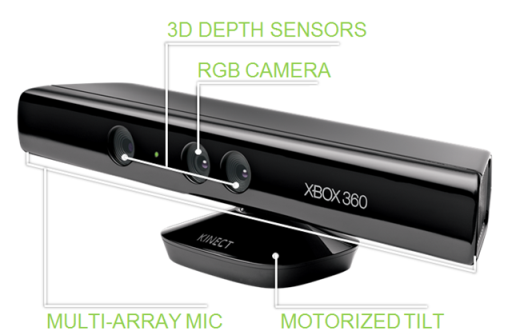
Here is what I did to get it installed with Ubuntu Meerkat 10.10:
1. Add the PPA for Freenect from https://launchpad.net/~arne-alamut/+archive/freenect
2. Install the following:
$ sudo apt-get install freenect libncurses5-dev libglut3-dev libX11-dev libxtst-dev libxmu-dev cmake git
3. Plug in Kinect to usb port on machine (unplug/replug if it already was)
4. Test the installation
$ freenect-glview
5. Should see a depth / video feed appear on the screen confirming the usb driver works
6. To get mouse cursor working (from https://github.com/Ooblik/Kinect-Mouse):
$ mkdir ~/kinect
$ cd ~/kinect
$ git clone https://github.com/Ooblik/Kinect-Mouse.git
$ cd ~/kinect/Kinect-Mouse
$ mkdir build
$ cd build
$ cmake ..
$ make
7. Run mouse client
$ ./kmouse
8. Enjoy mouse cursor control.
*Notes: The mouse control only works at a certain depth range. The video window will show whatever is "in-range" by highlighting it in red. To "click" you need to stop moving briefly and it will auto left-click.
As much as you would like to wave your open hands in the air to recreate Tom Cruise in the movie, I find that just using a single finger tip in range is usually the best method of control. :)
Here is what I did to get it installed with Ubuntu Meerkat 10.10:
1. Add the PPA for Freenect from https://launchpad.net/~arne-alamut/+archive/freenect
2. Install the following:
$ sudo apt-get install freenect libncurses5-dev libglut3-dev libX11-dev libxtst-dev libxmu-dev cmake git
3. Plug in Kinect to usb port on machine (unplug/replug if it already was)
4. Test the installation
$ freenect-glview
5. Should see a depth / video feed appear on the screen confirming the usb driver works
6. To get mouse cursor working (from https://github.com/Ooblik/Kinect-Mouse):
$ mkdir ~/kinect
$ cd ~/kinect
$ git clone https://github.com/Ooblik/Kinect-Mouse.git
$ cd ~/kinect/Kinect-Mouse
$ mkdir build
$ cd build
$ cmake ..
$ make
7. Run mouse client
$ ./kmouse
8. Enjoy mouse cursor control.
*Notes: The mouse control only works at a certain depth range. The video window will show whatever is "in-range" by highlighting it in red. To "click" you need to stop moving briefly and it will auto left-click.
As much as you would like to wave your open hands in the air to recreate Tom Cruise in the movie, I find that just using a single finger tip in range is usually the best method of control. :)
Sunday, December 5, 2010
Ubuntu Maverick DLNA Server - MediaTomb (fix: for Samsung Devices)
To setup a DLNA media server (watch videos, music, pictures on a networked AV Device) on Ubuntu:
Using web browser, navigate to http://localhost:49152 and setup your paths to media files on your machine. Start viewing content on your TV / BD Players!
Further Help here: https://help.ubuntu.com/community/MediaTomb
For Samsung devices: they need a header hack so add this section to the Mediatomb /etc/mediatomb/config.xml (found here):
#apt-get install mediatomb
#/etc/init.d/mediatomb start
Using web browser, navigate to http://localhost:49152 and setup your paths to media files on your machine. Start viewing content on your TV / BD Players!
Further Help here: https://help.ubuntu.com/community/MediaTomb
For Samsung devices: they need a header hack so add this section to the Mediatomb /etc/mediatomb/config.xml (found here):
<custom-http-headers>
 <add header="transferMode.dlna.org: Streaming"/>
 <add header="contentFeatures.dlna.org: DLNA.ORG_OP=01;DLNA.ORG_CI=0;DLNA.ORG_FLAGS=01700000000000000000000000000000"/>
</custom-http-headers>
Wednesday, December 1, 2010


Sunday, November 28, 2010
Problems with Samsung 3D glasses losing sync?
Do you have a problem with your Samsung 3D glasses losing sync? I was having an issue where the glasses where losing its sync every few minutes (3D fading, switching eyes, etc) due to too much IR crosstalk and interference. I fixed it by doing the following:
- Cut a small section of electrical tape as big as the sensor on the front of the glasses (the little rectangle in between the eyes)
- Place the electrical tape over the sensor leaving just a small sliver of the sensor exposed on the bottom edge.
- Turn on and enjoy a stable 3D picture.
- Cut a small section of electrical tape as big as the sensor on the front of the glasses (the little rectangle in between the eyes)
- Place the electrical tape over the sensor leaving just a small sliver of the sensor exposed on the bottom edge.
- Turn on and enjoy a stable 3D picture.
Tuesday, November 23, 2010

Subscribe to:
Posts (Atom)